RICOH GR Live View Shooting
The creator: @Tinker_ZhangOriginal post
Hot-shoe remote on a StickS3.
By TinkerZhang (@Tinker_Zhang)
- Posted
- GitHub stars
- 45 (GitHub)
- Likes on X
- 6 (X post)
What you need
- Difficulty
- Beginner · Our suggestion
- License
- GPL-3.0 (source)
Parts
- M5Stack StickS3 (ESP32-S3, 8 MB flash, 8 MB PSRAM) (board)
- RICOH GR II, GR III/IIIx or GR IV, 3D-printed hot-shoe adapter (STL and STEP in the repo), USB-C data cable
- AI model or service
- Codex AI assistant (co-developed the firmware, per the README)
Overview
TinkerZhang (sky18Dragon on GitHub) turned an M5Stack StickS3 into a remote for RICOH GR cameras. The firmware makes it a remote shutter and wireless live-view screen, with printable hot-shoe adapters in the repo; the README says it was developed together with the Codex AI assistant. The GR IIIx, GR IV, GR IV HDF and GR II are hardware verified; the GR III is implemented but still needs a full regression test, and the GR III/IIIx HDF models are experimental. GPL-3.0.
How it works
GR III and GR IV cameras pair over Bluetooth LE, which also switches the camera's Wi-Fi on and off; the GR II has no Bluetooth, so it uses manually enabled Wi-Fi and the official GR Remote HTTP API. Hold the StickS3 upright for the BLE shutter with the camera's Wi-Fi off; turn it sideways and the IMU switches to live view, streaming the camera's MJPEG preview over Wi-Fi and decoding it on the ESP32-S3. One Button A press runs autofocus and the shot. Flash it from M5Burner (search “GR”) or build it with PlatformIO.
Hardware
- M5Stack StickS3 (ESP32-S3, 8 MB flash, 8 MB PSRAM)
- RICOH GR II, GR III/IIIx or GR IV
- 3D-printed hot-shoe adapter (STL and STEP in the repo)
- USB-C data cable
Like this build? Get the weekly builds
Every Thursday: the 5 best gadget hacks you can copy. Free.
Built something? Submit a build
Credits and links
- TinkerZhang (@Tinker_Zhang): Creator
- WquGuru (@wquguru): Featured it in a roundup of OpenAI's hardware gallery
- License: GPL-3.0 (source)
This page is a short summary written by HardwareLab. Build steps, code and photos belong to the creator; follow “View original” for the full project.
Featured? Add this badge
Built this? Paste the badge into your README. It links back to this page.

Markdown
[](https://hardwarelab.dev/projects/ricoh-gr-live-view-shooting/?utm_source=badge&utm_medium=referral&utm_campaign=launch_2w)HTML
<a href="https://hardwarelab.dev/projects/ricoh-gr-live-view-shooting/?utm_source=badge&utm_medium=referral&utm_campaign=launch_2w"><img src="https://hardwarelab.dev/badge.svg" alt="Featured on HardwareLab" width="188" height="20"></a>Related builds
All 12 in Vision & Cameras
ESP-VISION object detection on ESP32-S3
Real-time object detection on an ESP32-S3 with no cloud.
- ESP32-S3
- camera
- SD card
Intermediate57
Nous-Girl: StackChan robot with Hermes Agent memory
Beta firmware that turns an M5Stack StackChan into a talking desk robot with faces, DJ mode and an optional Hermes Agent brain.
- M5Stack StackChan K151 (CoreS3, ESP32-S3)
- USB-C cable
- A computer for the voice server (only macOS on Apple Silicon tested so far)
Intermediate · Our suggestion35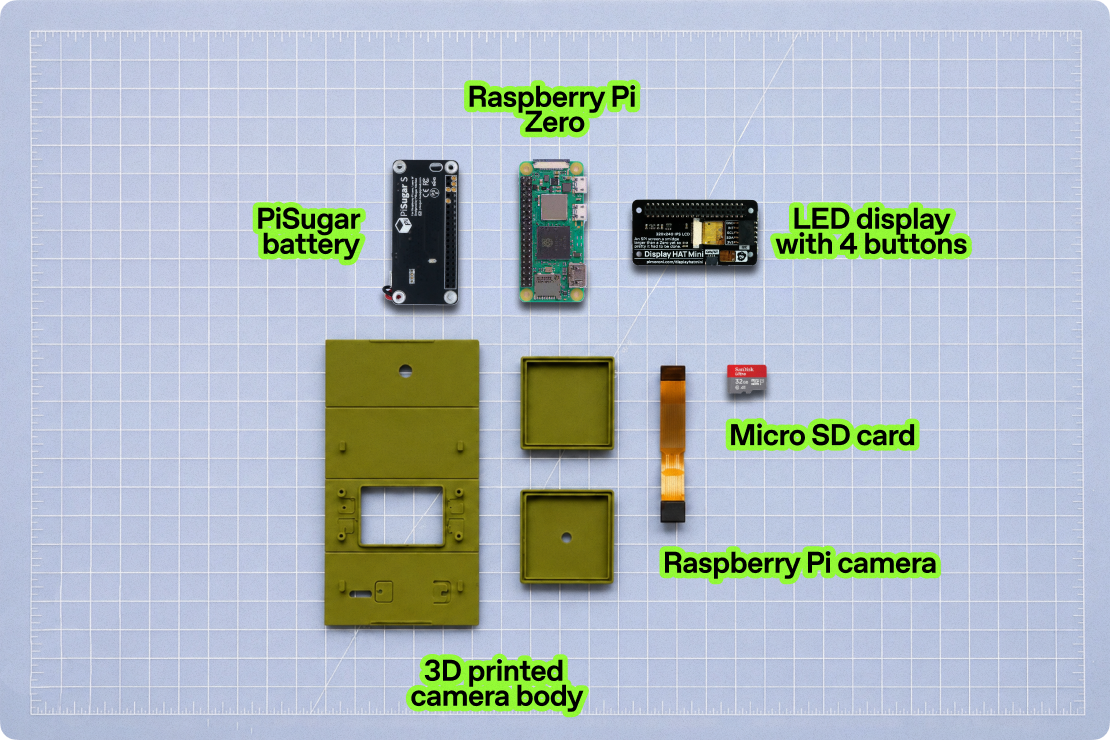
ImageGenCam
A DIY Pi Zero 2 W camera with image generation.
- Raspberry Pi Zero 2 W with headers
- Pimoroni Display HAT Mini (PIM589)
- Spy Camera for Raspberry Pi Zero (Adafruit 3508 or equivalent)
- +4 more
Intermediate · Our suggestion488
ROBOTAI
A two-board robot brain wired into Home Assistant and Ollama.
- Waveshare ESP32-S3-DualEye
- ESP32-CAM OV2640
Intermediate0