AI Raspberry Pi cat detection
A Raspberry Pi camera that spots your cat doing something it's not supposed to do and emails you; texts only through a carrier's email-to-SMS gateway.
- Hardware:
- Raspberry Pi, camera
- Difficulty:
- Beginner
- License:
- MIT
- Creator:
- ykhli
Get an email (and an Attenborough narration) when your cat jumps on the counter
By ykhli
- Posted
What it does
A Raspberry Pi camera that spots your cat doing something it's not supposed to do and emails you; texts only through a carrier's email-to-SMS gateway.
- Watches a room with a Pi camera and emails you when your cat does something it isn't supposed to. The creator's #1 use is catching the creator's cats on the dining table or kitchen counter.
- Optional AI narrator: an ElevenLabs voice narrates what it sees through a speaker on the Pi.
- Texts work too: send the email to your carrier's email-to-SMS gateway.
- Generalises to other vision jobs just by changing the prompt.
What you need
- Skill level
- Beginner
- License
- MIT
Parts
- Raspberry Pi 4 or 5 (Tested on Pi 4 and 5)
- Raspberry Pi camera (Creator links Camera Module 3 (Adafruit 5657); 'any camera should work')
- Speaker (Only for narration or the raccoon idea) [optional]
- AI model or service
- OpenAI vision model, optional local image classifier
- Accounts needed
- OpenAI API key, Resend API key with a verified domain, ElevenLabs API key and voice ID (optional)
Prices, notes and sources: Parts and requirements
Parts and requirements
| Part | Spec / notes | Needed | Price |
|---|---|---|---|
| Raspberry Pi 4 or 5 | Tested on Pi 4 and 5 · Price is Pi 5 4 GB | Required | $130.00Adafruit, checked |
| Raspberry Pi camera | Creator links Camera Module 3 (Adafruit 5657); 'any camera should work' | Required | $29.25Adafruit, checked |
| Speaker | Only for narration or the raccoon idea | Optional |
- OS: Standard Raspberry Pi OS setup per raspberrypi.com docs.
- OpenAI API key: required, Paid per use
- Resend API key with a verified domain: required
- ElevenLabs API key and voice ID: optional
Pi 5 from $130 + camera $29.25 (Adafruit); OpenAI usage extra
Prices: $130.00 at Adafruit (checked ), $29.25 at Adafruit (checked )
Full instructions: View original
How it works
The Pi takes photos with picamera2. Each one (or only the ones a local classifier flags) goes to an OpenAI vision model with your prompt. Through LangChain function calling, the model decides whether to send an email via Resend, and optionally ElevenLabs speaks a narration.
| Layer | Component | Runs on |
|---|---|---|
| Capture | picamera2 | Pi |
| Optional local filter | torchvision Swin V2-S ImageNet classifier | Pi |
| Vision + decision | OpenAI multimodal model (gpt-4-vision-preview in code) via LangChain function calling | Cloud |
| Notification | Resend email | Cloud |
| Narration | ElevenLabs (optional) | Cloud |
Setup effort
- Skill level
- Beginner
- Time
- No time stated by the creator.
Low: venv, pip install, copy .env, add 2-3 API keys, verify a domain in Resend, run camera.py.
Limits and caveats
- Every analysed photo is a paid OpenAI call unless you turn on the local filter (off by default).
- Resend needs a domain you own and verify before it sends email.
- Code pins gpt-4-vision-preview and 2024 library versions; no commits since 2024-04-30, so expect to update the model name.
- Saves every photo it takes to a static folder on the Pi.
Like this build? Get the weekly builds
Every Thursday: the 5 best gadget hacks you can copy. Free.
Built something? Submit a build
Things you can say or do
- Default prompt: knows three cats by look (Cookie, Pixel, Tangerine) and, only if one is on the counter, sends a two-sentence David Attenborough-style narration.
- Swap the prompt for a per-minute summary of what your cat is doing (the creator's tested example).
- Turn on USE_LOCAL_MODEL so a local torchvision classifier only calls OpenAI when an 'interesting' ImageNet class (animals etc.) appears, to cut API calls.
Use-case ideas
- Bird watching: email a daily summary of which birds came by.
- Raccoon deterrent: play a loud sound when raccoons go through the bins (needs an external speaker; the creator hasn't tried it).
- Plant monitor: email you when your plants are dying from lack of water.
- Package alert: email when a package arrives at the door, and say if it's a big one.
- Our suggestionDog-on-the-sofa alerts with the same prompt swap.
Hardware
- Raspberry Pi
- camera
Credits and links
- Yoko Li (ykhli): Creator
- License: MIT
This page is a short summary written by HardwareLab. Build steps, code and photos belong to the creator; follow “View original” for the full project.
Featured? Add this badge
Built this? Paste the badge into your README. It links back to this page.

Markdown
[](https://hardwarelab.dev/projects/ai-rpi-cat-detection/?utm_source=badge&utm_medium=referral&utm_campaign=launch_2w)HTML
<a href="https://hardwarelab.dev/projects/ai-rpi-cat-detection/?utm_source=badge&utm_medium=referral&utm_campaign=launch_2w"><img src="https://hardwarelab.dev/badge.svg" alt="Featured on HardwareLab" width="188" height="20"></a>Related builds
All 12 in Vision & Cameras
Raspberry Pi 5 Hailo 8 Pothole Detection System
Detects, classifies and sizes potholes from a Pi 5.
- Raspberry Pi 5
- Hailo-8
- camera
Advanced144
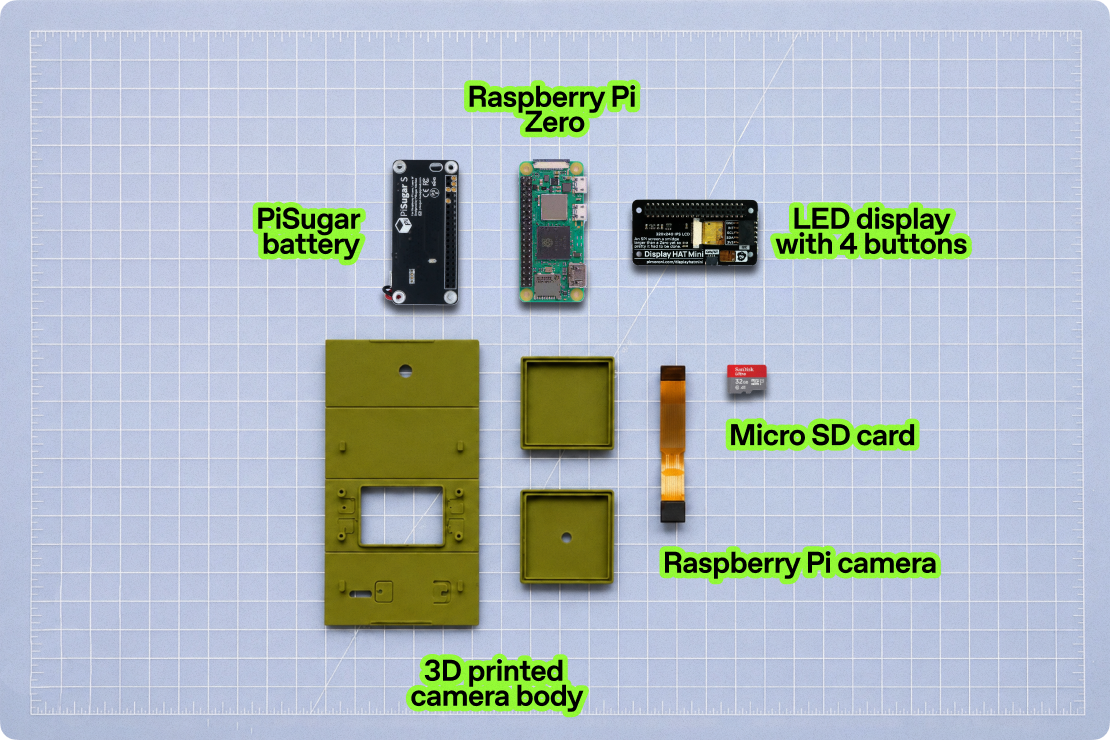
ImageGenCam
A DIY Pi Zero 2 W camera with image generation.
- Raspberry Pi Zero 2 W with headers
- Pimoroni Display HAT Mini (PIM589)
- Spy Camera for Raspberry Pi Zero (Adafruit 3508 or equivalent)
- +4 more
Intermediate · Our suggestion488
Maple Syrup Pi Camera
A low-power 3D-printed smart camera with a Coral TPU.
- Raspberry Pi Zero W
- Coral EdgeTPU
- camera
Intermediate75First-plant Pi dashboard
Sensors, VPD and AI photo analysis for a single plant.
- Raspberry Pi
- sensors
- camera
Beginner

