ClaudeBerry
The creator: @0xProbabillityOriginal post
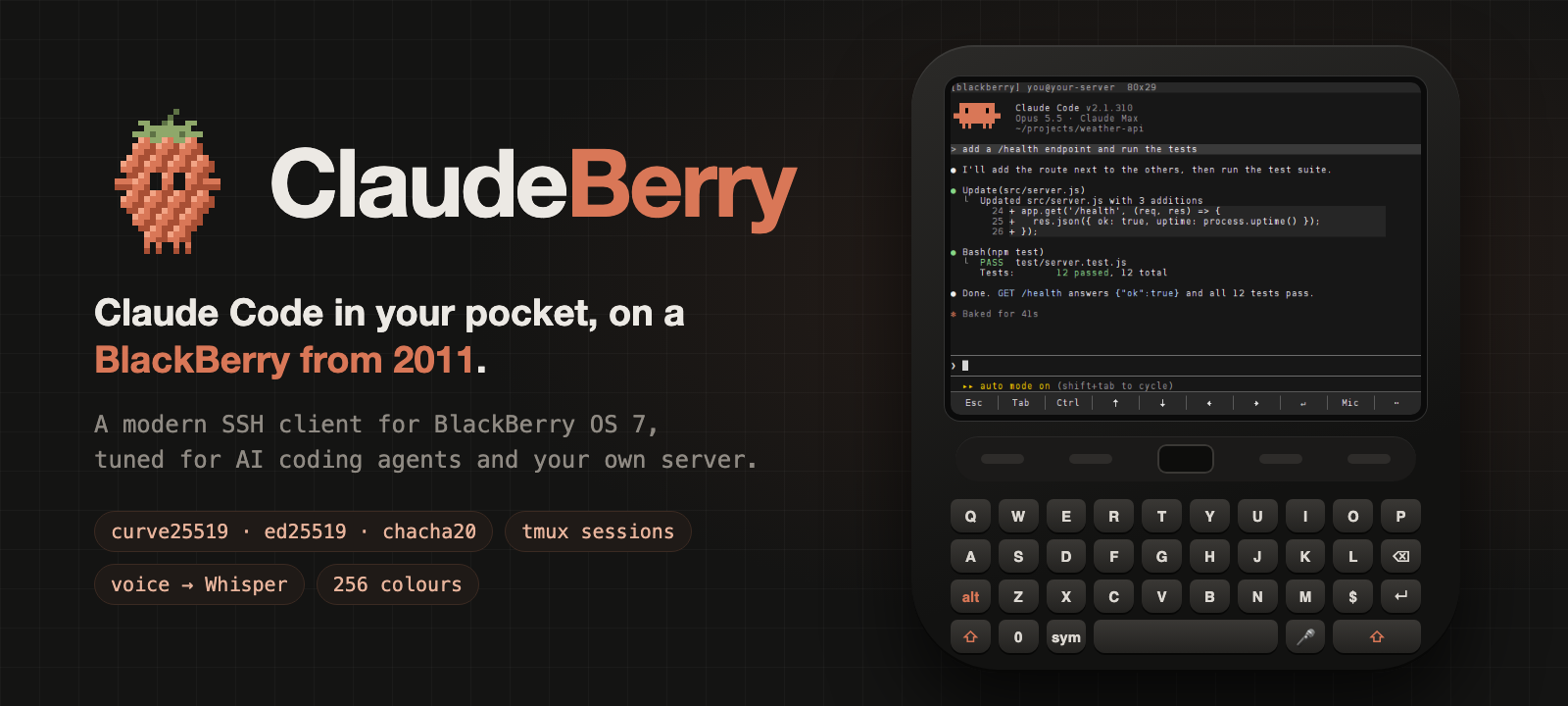
A BlackBerry Bold becomes a pocket Claude Code terminal
- Posted
- GitHub stars
- 45 (GitHub)
What you need
- Skill level
- Intermediate
- License
- GPL-2.0-or-later (source)
Parts
- BlackBerry OS 7 or 7.1 phone (Bold 9900 or 9930 is the target; Bold 9790 is also confirmed)
- SSH server (Linux VPS, home server or Raspberry Pi with OpenSSH 6.5 or newer)
- macOS or Linux build computer (JDK 8 or Docker, Python 3 and curl)
- AI model or service
- Claude Code, faster-whisper
Prices, notes and sources: Parts and requirements
Steps
- Skill level
- Intermediate
- Create a dedicated Ed25519 key for the phone, copy its public key to the server, and install tmux and Claude Code there.
- Clone ClaudeBerry, fetch its build dependencies, and run make_preset.sh with the server login and phone key.
- Build with JDK 8 or Docker to produce claudeberry.jad and claudeberry.jar.
- Copy both files to the phone over Bluetooth or USB, open the JAD, and allow the requested permissions.
- Open ClaudeBerry, connect to tmux, and start Claude Code. Optionally install the voice helper on the server.
Full instructions: View original
Like this build? Get the weekly builds
Every Thursday: the 5 best gadget hacks you can copy. Free.
Built something? Submit a build
Overview
ClaudeBerry is an open-source SSH client tuned for running Claude Code from a BlackBerry OS 7 phone. The creator, @0xProbabillity, adds persistent tmux sessions, agent-friendly keys, modern terminal colour and voice prompting transcribed by Whisper on the user's own server.
What it does
- Opens an SSH session to a server the user owns and rejoins the same tmux session after a dropped connection.
- Adds an on-screen key bar and quick panel for keys Claude Code needs, including Esc, Tab, Ctrl, arrows and Enter.
- Records a voice prompt on the phone and has faster-whisper transcribe it on the user's server before placing the text at the prompt.
Parts and requirements
| Part | Spec / notes | Needed | Price |
|---|---|---|---|
| BlackBerry OS 7 or 7.1 phone | Bold 9900 or 9930 is the target; Bold 9790 is also confirmed | Required | |
| SSH server | Linux VPS, home server or Raspberry Pi with OpenSSH 6.5 or newer | Required | |
| macOS or Linux build computer | JDK 8 or Docker, Python 3 and curl | Required |
- RAM: About 1 GB free on the server for voice input
- OS: BlackBerry OS 7 or 7.1; Linux on the server
- Network: Wi-Fi or mobile data the phone can use
- Computer for setup: macOS or Linux with JDK 8 or Docker, Python 3 and curl
- About 1 GB free disk on the server for voice input
- An Ed25519 SSH key for the phone
How it works
The phone opens an SSH session to the user's server and starts or rejoins a tmux session named bb. Voice uses a second short SSH connection: the phone sends audio to berryssh-transcribe, faster-whisper runs on the server, and the returned text is typed at the prompt without pressing Enter.
| Layer | Component | Runs on |
|---|---|---|
| Phone client | ClaudeBerry, based on berryssh | BlackBerry OS 7 |
| Terminal session | OpenSSH and tmux | User's server |
| Coding agent | Claude Code | User's server |
| Voice transcription | faster-whisper | User's server |
Setup effort
- Skill level
- Intermediate
Limits and caveats
- Only the Bold 9900 and 9790 are confirmed; BlackBerry 10 and Android BlackBerry phones cannot run this Java ME app.
- A preset build contains the phone's private SSH key, so it must be copied only to the user's phone and never published or served over the network.
Hardware
- BlackBerry Bold 9900 or another BlackBerry OS 7 phone
- Linux server, home server or Raspberry Pi
Credits and links
- @0xProbabillity: The creator
- Mert Cobanov: Creator of berryssh, the base project
- License: GPL-2.0-or-later (source)
Sources
- github.com/0xProbabillity/claudeberry/blob/6d7395d9fb56c8c6c10cb06cf1a40be03c3a1ea3/README.md#L27-L34
- github.com/0xProbabillity/claudeberry/blob/6d7395d9fb56c8c6c10cb06cf1a40be03c3a1ea3/README.md#L53-L64
- github.com/0xProbabillity/claudeberry/blob/6d7395d9fb56c8c6c10cb06cf1a40be03c3a1ea3/README.md#L90-L92
- github.com/0xProbabillity/claudeberry/blob/6d7395d9fb56c8c6c10cb06cf1a40be03c3a1ea3/README.md#L118-L131
- github.com/0xProbabillity/claudeberry/blob/6d7395d9fb56c8c6c10cb06cf1a40be03c3a1ea3/README.md#L132-L136
- github.com/0xProbabillity/claudeberry/blob/6d7395d9fb56c8c6c10cb06cf1a40be03c3a1ea3/README.md#L134-L136
- github.com/0xProbabillity/claudeberry/blob/6d7395d9fb56c8c6c10cb06cf1a40be03c3a1ea3/README.md#L116-L136
- github.com/0xProbabillity/claudeberry/blob/6d7395d9fb56c8c6c10cb06cf1a40be03c3a1ea3/README.md#L41-L48
- github.com/0xProbabillity/claudeberry/blob/6d7395d9fb56c8c6c10cb06cf1a40be03c3a1ea3/README.md#L104-L114
- github.com/0xProbabillity/claudeberry/blob/6d7395d9fb56c8c6c10cb06cf1a40be03c3a1ea3/README.md#L27-L31
- github.com/0xProbabillity/claudeberry/blob/6d7395d9fb56c8c6c10cb06cf1a40be03c3a1ea3/README.md#L138-L160
- github.com/0xProbabillity/claudeberry/blob/6d7395d9fb56c8c6c10cb06cf1a40be03c3a1ea3/README.md#L157-L160
This page is a short summary written by HardwareLab. Build steps, code and photos belong to the creator; follow “View original” for the full project.
Featured? Add this badge
Built this? Paste the badge into your README. It links back to this page.

Markdown
[](https://hardwarelab.dev/projects/claudeberry/?utm_source=badge&utm_medium=referral&utm_campaign=launch_2w)HTML
<a href="https://hardwarelab.dev/projects/claudeberry/?utm_source=badge&utm_medium=referral&utm_campaign=launch_2w"><img src="https://hardwarelab.dev/badge.svg" alt="Featured on HardwareLab" width="188" height="20"></a>Related builds
All 21 in Agent Desk GadgetsPi Zero AI usage desk gadget
Seven screens of AI quota on a 1.3in display.
- Raspberry Pi Zero 2 W
- 1.3in screen
- joystick
Beginner
Pi agent with a thermal camera
A Pi agent face that knows when you're in the room and asks for approvals.
- Raspberry Pi 4
- Adafruit MLX90640
- Pimoroni Display HAT Mini
- +1 more
Intermediate
Pixel Agents ESP32
Your Claude Code and Codex agents as pixel-art office workers.
- ESP32 display board
Beginner7
3D Home TV OS
A Google TV home screen that is a live 3D model of your home, with the lights wired in and no ads.
- Google TV or Android TV (tested on a Philips Google TV)
- Philips Hue or other Home Assistant lights
- iPhone or iPad Pro with LiDAR (optional, for the scanner app)
- +1 more
Advanced · Our suggestion59
