Turn a digital photo frame into a family wall dashboard
A photo frame with factory root over ADB, turned into a family wall dashboard
By @lito_ordes
- Posted
- GitHub stars
- 9 (GitHub)
Build sheet
- Parts
- XORO CPF 10PF 10.1" digital photo frame (1920x1200, Android 10 eng build), Computer with ADB for setup
- AI model or service
- Claude Code (the repo is a guide for coding agents like it)
- Difficulty
- Advanced
- Accounts needed
- Planify-Backend reachable over HTTPS, plus an account made in Planify-APP
- License
- MIT
Parts list
- XORO CPF 10PF 10.1" digital frame (Allwinner A133, 1 GB RAM, 1920×1200, Android 10 eng build) [9]
- USB-C data cable (Must carry data, not only charge) [10]
- Computer with adb, JDK 17+ and the Android SDK (Tested on Linux) [11]
Prices and notes: Parts and requirements
Steps
- Skill level
- Advanced
- Phase 1: confirm it is exactly this hardware and software (identity checks)
- Phase 2: verified eMMC backup (SHA-256 of every piece)
- Phase 3: choose the app and backend
- Phase 4: configure and build
- Phase 5: install and make the frame a kiosk (Device Owner)
- Phase 6: isolate the frame with the firewall
- Phase 7: updates over Wi-Fi from one IP
- Phase 8: boot logo, screen schedule and power
- Phase 9: first use (Wi-Fi, sign in, settings)
- Phase 10: final checks [19]
Full instructions: View original
Like this build? Get the weekly builds
Get the best new AI hardware builds every Thursday. One email a week, free.
Built something? Submit a build
Overview
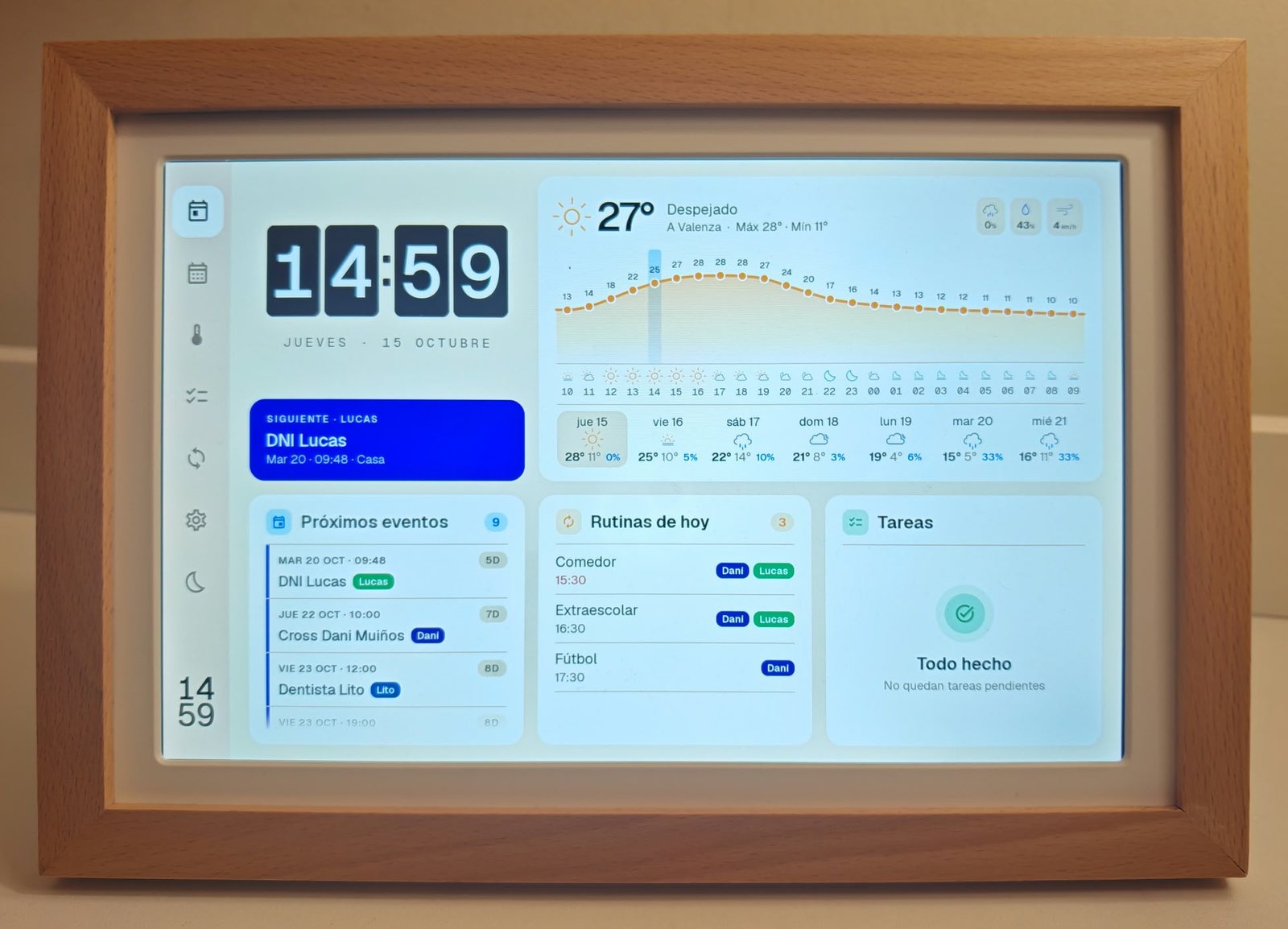
Lito (@lito_ordes) replaced the maker's app on a 10.1" XORO CPF 10PF photo frame with a native Android dashboard: a split-flap clock, Open-Meteo weather, a swipeable week calendar, routines, tasks and a dim night clock. He calls it fully compatible with Claude Code and says the native Android app, with everything superfluous removed, took less than one 5-hour Claude session; the project started from Wes Bos's photo-frame-dashboard. The repo (eusonlito/Planify-Dashboard, MIT) is written as a step-by-step guide for your own coding agent.
What it does
- Turns a digital photo frame into a family wall screen: time, weather, events, routines and tasks at a glance, without the maker’s app or a subscription. [1]
- Today screen: a split-flap clock, the next event with a countdown, the weather (now, hour by hour and the coming days), upcoming events, today’s routines and tasks. [2]
- A week calendar you swipe through, a weather page with a 24-hour view per day, task lists in columns, and a dim night clock outside screen hours. [3]
- Keeps showing the last data when the network drops: content refreshes every 5 minutes and the weather every 30. [4]
- The repo is written mainly as a guide for coding agents such as Claude Code or Codex to build their own version, the same way the creator started from wesbos/photo-frame-dashboard. [5]
The creator's config
Copied word for word from the creator's repository, at the commit linked in each source.
Phase 4 configuration (comments in Spanish, from the README) [6]
cp android/planify.properties.example android/planify.properties
#   planify.baseUrl=https://tu-backend/        URL de la API (obligatoria para la release)

cp scripts/config.example scripts/config.local
#   ADB_FROM=<ip-de-tu-pc>                     única IP que podrá usar ADB por Wi-Fi (vacía: solo USB)
#   FRAME_TIMEZONE=Europe/Madrid               opcional (por defecto, la de tu PC)
#   FRAME_NTP=pool.ntp.org                     opcional
Use-case ideas
Parts and requirements
| Part | Spec / notes | Needed | Price |
|---|---|---|---|
| XORO CPF 10PF 10.1" digital frame [9] | Allwinner A133, 1 GB RAM, 1920×1200, Android 10 eng build | Required | |
| USB-C data cable [10] | Must carry data, not only charge | Required | |
| Computer with adb, JDK 17+ and the Android SDK [11] | Tested on Linux | Required |
- Network: 2.4 GHz Wi-Fi with WPA2 (the frame’s chip has no WPA3 or 5 GHz); a guest network is better
- Computer for setup: Computer with adb, JDK 17 or later and the Android SDK (compileSdk 37); tested on Linux
- Planify-Backend reachable over HTTPS, plus an account made in Planify-APP: only if you use this app as is [12]
- Requirements source: [13]
How it works
The frame ships with an Android 10 `eng` build that gives root over ADB, so no exploit is needed. A native Kotlin/Jetpack Compose app runs as a Device Owner kiosk and reads from a backend plus Open-Meteo, and a per-UID firewall lets only the dashboard reach the internet. Steps: 1) verify the eng build has root (adb shell id returns uid=0); 2) make a verified eMMC backup (SHA-256 of every piece); 3) pick a backend (Planify, Google Calendar, CalDAV or Home Assistant); 4) install the app as Device Owner; 5) set up the firewall and the screen schedule. Built on a XORO CPF 10PF. Other frames need a different root path; see the Wes Bos guide for other models.
| Layer | Component | Runs on |
|---|---|---|
| Dashboard app | Native Kotlin and Jetpack Compose dashboard, read-only [14] | Android app (android/) |
| Kiosk | Device Owner with lock task (no home or recents buttons) [15] | Frame |
| Data | Planify-Backend (PHP + SQLite) API [16] | Planify-Backend |
| Weather | Open-Meteo, no API key [17] | Open-Meteo |
| Isolation | Per-UID firewall: only the dashboard reaches the internet [18] | Frame |
Setup effort
- Skill level
- Advanced
scripts/install.sh runs phases 2 and 4 to 8 in one go and can be re-run; the README says to understand each phase before launching it. [19]
Limits and caveats
- Many similar frames use the same A133 SoC or Rockchip boards but change the build (many are user builds without root), partitions, touch and Wi-Fi. [20]
- 1 GB of RAM and heat: continuous animations pushed the frame to 72 °C; pre-rendered frames keep it around 60 °C. [21]
- The frame’s Wi-Fi has no WPA3 or 5 GHz, and its clock loses the time without a network. [22]
Based on
Take over a cheap Android photo frame and run your own family dashboard by @wesbos.
Hardware
- XORO CPF 10PF 10.1" digital photo frame (1920x1200, Android 10 eng build)
- Computer with ADB for setup
Credits and links
- Lito (@lito_ordes): Creator
- Wes Bos: photo-frame-dashboard: the idea and method it builds on
- License: MIT
Sources
- github.com/eusonlito/Planify-Dashboard/blob/4365128c069dc99347b2b1b5cb138697a765ffa3/README.md?plain=1#L3
- github.com/eusonlito/Planify-Dashboard/blob/4365128c069dc99347b2b1b5cb138697a765ffa3/README.md?plain=1#L272
- github.com/eusonlito/Planify-Dashboard/blob/4365128c069dc99347b2b1b5cb138697a765ffa3/README.md?plain=1#L273-L276
- github.com/eusonlito/Planify-Dashboard/blob/4365128c069dc99347b2b1b5cb138697a765ffa3/README.md?plain=1#L281
- github.com/eusonlito/Planify-Dashboard/blob/4365128c069dc99347b2b1b5cb138697a765ffa3/README.md?plain=1#L5
- github.com/eusonlito/Planify-Dashboard/blob/4365128c069dc99347b2b1b5cb138697a765ffa3/README.md?plain=1#L200-L209
- github.com/eusonlito/Planify-Dashboard/blob/4365128c069dc99347b2b1b5cb138697a765ffa3/README.md?plain=1#L189-L195
- github.com/eusonlito/Planify-Dashboard/blob/4365128c069dc99347b2b1b5cb138697a765ffa3/README.md?plain=1#L317
- github.com/eusonlito/Planify-Dashboard/blob/4365128c069dc99347b2b1b5cb138697a765ffa3/README.md?plain=1#L109-L126
- github.com/eusonlito/Planify-Dashboard/blob/4365128c069dc99347b2b1b5cb138697a765ffa3/README.md?plain=1#L161
- github.com/eusonlito/Planify-Dashboard/blob/4365128c069dc99347b2b1b5cb138697a765ffa3/README.md?plain=1#L149-L154
- github.com/eusonlito/Planify-Dashboard/blob/4365128c069dc99347b2b1b5cb138697a765ffa3/README.md?plain=1#L163
- github.com/eusonlito/Planify-Dashboard/blob/4365128c069dc99347b2b1b5cb138697a765ffa3/README.md?plain=1#L147-L163
- github.com/eusonlito/Planify-Dashboard/blob/4365128c069dc99347b2b1b5cb138697a765ffa3/README.md?plain=1#L186
- github.com/eusonlito/Planify-Dashboard/blob/4365128c069dc99347b2b1b5cb138697a765ffa3/README.md?plain=1#L216-L222
- github.com/eusonlito/Planify-Dashboard/blob/4365128c069dc99347b2b1b5cb138697a765ffa3/README.md?plain=1#L9
- github.com/eusonlito/Planify-Dashboard/blob/4365128c069dc99347b2b1b5cb138697a765ffa3/README.md?plain=1#L197
- github.com/eusonlito/Planify-Dashboard/blob/4365128c069dc99347b2b1b5cb138697a765ffa3/README.md?plain=1#L228-L231
- github.com/eusonlito/Planify-Dashboard/blob/4365128c069dc99347b2b1b5cb138697a765ffa3/README.md?plain=1#L169-L262
- github.com/eusonlito/Planify-Dashboard/blob/4365128c069dc99347b2b1b5cb138697a765ffa3/README.md?plain=1#L307
- github.com/eusonlito/Planify-Dashboard/blob/4365128c069dc99347b2b1b5cb138697a765ffa3/README.md?plain=1#L295
- github.com/eusonlito/Planify-Dashboard/blob/4365128c069dc99347b2b1b5cb138697a765ffa3/README.md?plain=1#L293-L294
This page is a short summary written by HardwareLab. Build steps, code and photos belong to the creator; follow “View original” for the full project.
Featured? Add this badge
Built this? Paste the badge into your README. It links back to this page.

Markdown
[](https://hardwarelab.dev/projects/planify-dashboard/?utm_source=badge&utm_medium=referral&utm_campaign=launch_2w)HTML
<a href="https://hardwarelab.dev/projects/planify-dashboard/?utm_source=badge&utm_medium=referral&utm_campaign=launch_2w"><img src="https://hardwarelab.dev/badge.svg" alt="Featured on HardwareLab" width="188" height="20"></a>Related builds
All 39 in Digital Picture Frames & E-Ink
Quote0 Burnout
AI-usage and rate-limit meter on a Quote/0 e-ink display.
- MindReset Quote/0 e-ink display
Beginner9Kindle + Claude Code
Agent-assisted Kindle modding: Claude Code jailbroke a Kindle over USB.
- Kindle Paperwhite (12th gen)
Intermediate · Our suggestion