CleanYourTV
Claude Code debloats an Android TV over Wi-Fi and gives it an Apple TV-style home
By Gathin (@gathint)
- Posted
- GitHub stars
- 24.1K (GitHub)
- Likes on X
- 31.9K (X post)
Build sheet
- Parts
- Android TV or Google TV (TV, box or stick), Computer on the same Wi-Fi as the TV
- AI model or service
- Claude Code (Codex or Gemini CLI also work)
- Difficulty
- Intermediate · Our suggestion
- Setup time
- About 15 minutes
- License
- MIT (source)
Parts list
- Android TV or Google TV (Anything running Android TV or Google TV; Fire TV gets the debloat half only) [6]
- Computer on the same Wi-Fi as the TV (With a coding assistant that has shell access) [7]
Prices and notes: Parts and requirements
Steps
- Skill level
- Intermediate
- Time
- About 15 minutes
- On the TV: unlock Developer options and turn on USB debugging (and Network/ADB debugging if shown)
- On your computer: paste PROMPT.md into your assistant and fill in your TV model
- Accept “Allow USB debugging?” on the TV and answer the checklist: apps you use, the dock size and app order, voice assistant, Chromecast and updates [12]
Full instructions: View original
Like this build? Get the weekly builds
Get the best new AI hardware builds every Thursday. One email a week, free.
Built something? Submit a build
Part of: Hack a gadget you already own →
Overview
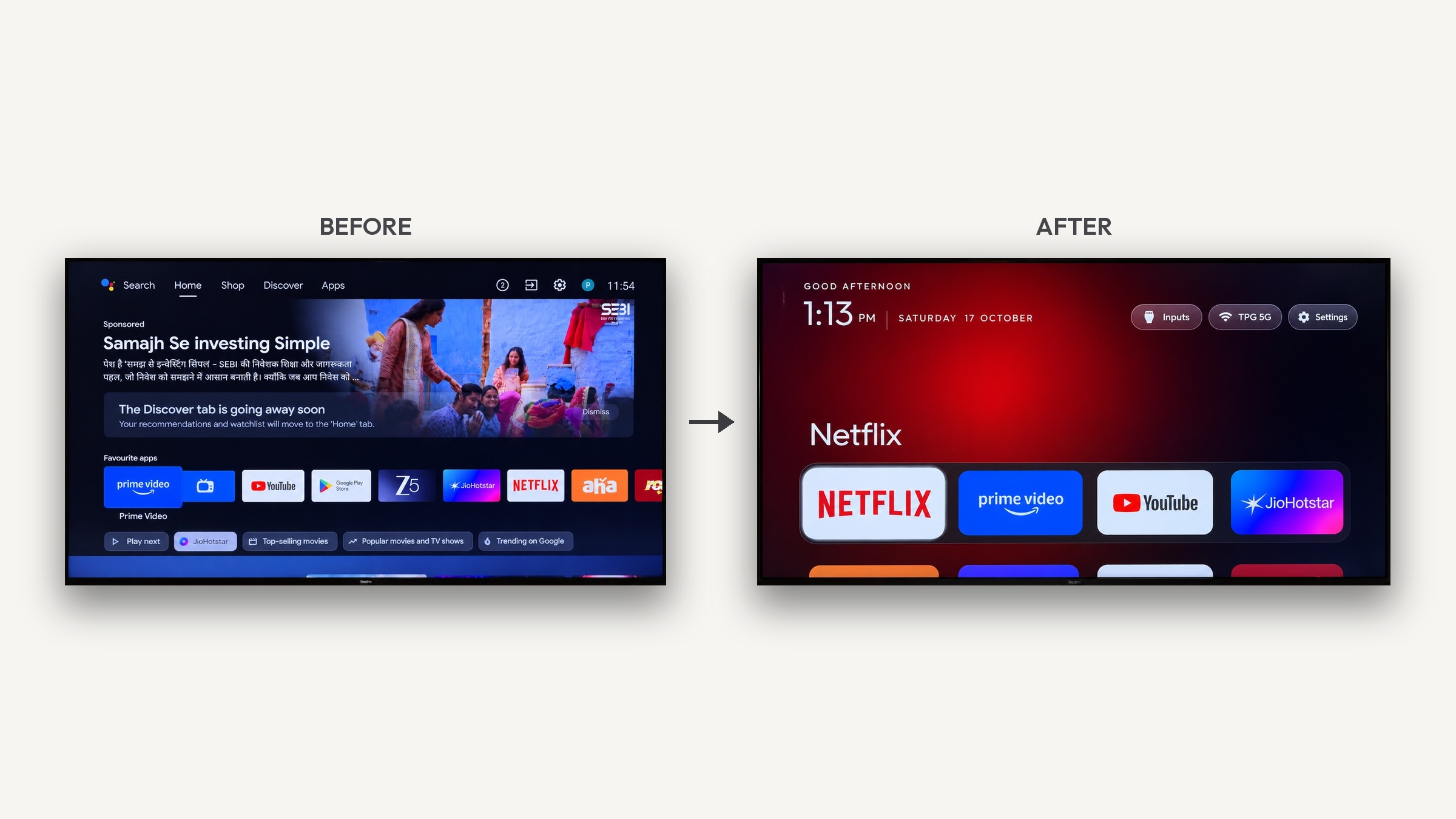
Gathin (@gathint) gave Claude Code his parents' TV model number; it found the TV on Wi-Fi, removed 25 Xiaomi packages and wrote a new launcher, and the TV “Looks like an Apple TV now”. The repo (Gathin23/cleanyourtv, MIT, formerly tv-vibehack) turns that into a prompt, debloat lists for 232 TV models and a 471 KB launcher: no root, no cable, nothing uninstalled, and a one-line restore.
What it does
- “Gave Claude Code the model number, it found the TV on wifi, removed 25 Xiaomi packages and wrote a new launcher. Looks like an Apple TV now lol” [1]
- Strips the bloatware from an Android TV or Google TV over Wi-Fi and replaces the ad-filled home screen with a clean launcher: no root, no cable, nothing uninstalled, and a one-line restore. [2]
- Backs up the package list and settings, disables telemetry, ad services, content rows and preloaded apps with pm disable-user, then installs the launcher as the default home screen. [3]
- The assistant checks each step with screenshots pulled from the TV; with the repo as context it takes about fifteen minutes. [4]
- Tested debloat lists from contributors, one folder per model, cover 232 TV models from 66 brands. [5]
Parts and requirements
| Part | Spec / notes | Needed | Price |
|---|---|---|---|
| Android TV or Google TV [6] | Anything running Android TV or Google TV; Fire TV gets the debloat half only | Required | |
| Computer on the same Wi-Fi as the TV [7] | With a coding assistant that has shell access | Required |
- Computer for setup: Python 3 for the tools; JDK 17 and Android SDK platform 34 to build the launcher
- Requirements source: [8]
How it works
Android TVs have the same debug bridge (ADB) as Android phones. You switch on USB debugging in the TV's developer options, paste the repo's PROMPT.md into a coding assistant with shell access on a computer on the same Wi-Fi, and it 1) backs up the installed packages and settings, 2) disables telemetry, ad services, content rows and preloaded apps with pm disable-user (nothing is uninstalled, so a restore script can undo it) and 3) builds and installs a small native launcher as the default home screen. With the repo as context it takes about fifteen minutes.
Setup effort
- Skill level
- Intermediate
- Time
- About 15 minutes
Turn on USB debugging on the TV, paste PROMPT.md into your assistant with your TV model, then accept the debugging prompt and answer its checklist. [12]
Limits and caveats
- Samsung (Tizen) and LG (webOS) TVs run different systems; see SHOWCASE.md for three webOS ports. [13]
- Fire TV gets the debloat half only, and a few China-market TCL sets refuse to install any launcher. [14]
- Network ADB is plaintext on port 5555; the README says to turn debugging off and confirm the port is closed when you're done. [15]
- It does not remove YouTube ads, which come from the same servers as the videos. [16]
- No prebuilt APK: you build the launcher with the one-line script. [17]
Why it's interesting
CleanYourTV strips the bloatware from an Android TV or Google TV over Wi-Fi and replaces the ad-filled home screen with a clean launcher that looks like an Apple TV, with no root, no cable and nothing uninstalled. It works because Android TVs have the same debug bridge as Android phones: you paste PROMPT.md into a coding assistant with shell access, and it backs up the installed packages and settings, disables the manufacturer's telemetry, ad services, content rows and preloaded junk with pm disable-user, and installs a small native launcher as the default home screen. Nothing is uninstalled, so a restore script can undo every step. The assistant checks each step with screenshots pulled from the TV, and with the repo as context it takes about fifteen minutes. Contributors have added tested debloat lists for 232 TV models from 66 brands, and the launcher, about 471 KB and written in plain Java, is built for TVs with 1 GB of RAM. The README is just as clear about the limits: Samsung and LG are not covered, Fire TV gets the debloat half only, and network ADB should be switched off when you are done.
Source: github.com/Gathin23/cleanyourtv/blob/34e1c42925268286c9e1c3edca4134cbf9b9cf70/README.md
Hardware
- Android TV or Google TV (TV, box or stick)
- Computer on the same Wi-Fi as the TV
Credits and links
- Gathin (@gathint): Creator
- License: MIT (source)
Sources
- x.com/gathint/status/2111379569030939102
- github.com/Gathin23/cleanyourtv/blob/5604bb6780c544b62cf1ce27f96af35727557133/README.md?plain=1#L2
- github.com/Gathin23/cleanyourtv/blob/5604bb6780c544b62cf1ce27f96af35727557133/README.md?plain=1#L36-L40
- github.com/Gathin23/cleanyourtv/blob/5604bb6780c544b62cf1ce27f96af35727557133/README.md?plain=1#L58-L59
- github.com/Gathin23/cleanyourtv/blob/34e1c42925268286c9e1c3edca4134cbf9b9cf70/README.md?plain=1#L103-L349
- github.com/Gathin23/cleanyourtv/blob/5604bb6780c544b62cf1ce27f96af35727557133/README.md?plain=1#L89-L94
- github.com/Gathin23/cleanyourtv/blob/5604bb6780c544b62cf1ce27f96af35727557133/README.md?plain=1#L48
- github.com/Gathin23/cleanyourtv/blob/5604bb6780c544b62cf1ce27f96af35727557133/README.md?plain=1#L334-L453
- github.com/Gathin23/cleanyourtv/blob/5604bb6780c544b62cf1ce27f96af35727557133/README.md?plain=1#L48-L55
- github.com/Gathin23/cleanyourtv/blob/5604bb6780c544b62cf1ce27f96af35727557133/README.md?plain=1#L351
- github.com/Gathin23/cleanyourtv/blob/34e1c42925268286c9e1c3edca4134cbf9b9cf70/README.md?plain=1#L459
- github.com/Gathin23/cleanyourtv/blob/5604bb6780c544b62cf1ce27f96af35727557133/README.md?plain=1#L53-L59
- github.com/Gathin23/cleanyourtv/blob/34e1c42925268286c9e1c3edca4134cbf9b9cf70/README.md?plain=1#L101
- github.com/Gathin23/cleanyourtv/blob/5604bb6780c544b62cf1ce27f96af35727557133/README.md?plain=1#L94-L95
- github.com/Gathin23/cleanyourtv/blob/5604bb6780c544b62cf1ce27f96af35727557133/README.md?plain=1#L676-L683
- github.com/Gathin23/cleanyourtv/blob/5604bb6780c544b62cf1ce27f96af35727557133/README.md?plain=1#L704
- github.com/Gathin23/cleanyourtv/blob/5604bb6780c544b62cf1ce27f96af35727557133/README.md?plain=1#L722-L723
This page is a short summary written by HardwareLab. Build steps, code and photos belong to the creator; follow “View original” for the full project.
Featured? Add this badge
Built this? Paste the badge into your README. It links back to this page.

Markdown
[](https://hardwarelab.dev/projects/cleanyourtv/?utm_source=badge&utm_medium=referral&utm_campaign=launch_2w)HTML
<a href="https://hardwarelab.dev/projects/cleanyourtv/?utm_source=badge&utm_medium=referral&utm_campaign=launch_2w"><img src="https://hardwarelab.dev/badge.svg" alt="Featured on HardwareLab" width="188" height="20"></a>Related builds
All 13 in Smart Home
Pokemote
A Pi agent that plays shows on an LG TV without the WebOS UI.
- Raspberry Pi
- LG WebOS TV
Intermediate74Kindle + Claude Code
Agent-assisted Kindle modding: Claude Code jailbroke a Kindle over USB.
- Kindle Paperwhite (12th gen)
Intermediate · Our suggestionDIY Skylight-style family calendar
Skipped the subscription and built it with a Pi and Claude Code.
- Raspberry Pi
- display
Beginner

